
Video editing plays an essential role in modern video production. From corporate films and marketing videos to social media content, training materials and promotional campaigns, professional editing can transform raw footage into clear, engaging and effective content. For individuals and organisations looking to develop practical post-production skills, Editing Courses in UK can provide structured training in professional editing techniques, workflows and software.
Video Mastery provides practical editing and visual effects training designed around the needs, experience and equipment of participants. Its courses cover professional platforms including Adobe Premiere Pro, DaVinci Resolve and Adobe Audition, as well as related areas such as colour grading, visual effects, animation and audio editing.
Why Learn Video Editing?
Good video editing involves much more than simply cutting clips together. Editors need to understand storytelling, pacing, sound, transitions, colour and visual structure. A well-organised editing workflow can also make production more efficient and help teams create consistent content.
Learning professional video editing can help you develop skills in:
- Organizing and managing video footage
- Importing and preparing media
- Trimming and assembling clips
- Building professional timelines
- Adding titles, captions and subtitles
- Creating transitions and effects
- Editing dialogue and sound
- Applying color correction
- Using key frame animation
- Exporting videos for online platforms
These skills can be useful for marketing teams, trainers, communications professionals, filmmakers, content creators and businesses producing video internally.
What Are Editing Courses in UK?
Editing Courses in UK are designed to teach the creative and technical processes involved in post-production. Training can range from introductory courses for beginners to advanced programmes covering colour grading, visual effects, audio, animation and professional workflows.
The most suitable training depends on your current experience and the software you use. Someone starting from scratch may benefit from an introductory editing course, while an experienced editor may need advanced training in colour grading, multicamera editing, motion graphics or audio.
Video Mastery’s editing training is hands-on and can be tailored to the needs of the delegates and organisation. Its courses are generally delivered at the client’s premises, with training designed around participants’ existing skills, equipment and production requirements.
Adobe Premiere Pro Training
Adobe Premiere Pro is widely used for professional video editing, and learning its workflow can help editors work more efficiently.
Video Mastery’s Adobe Premiere Pro Introduction course covers fundamental editing processes including media importing, clip trimming, timeline assembly, effects, transitions, basic keyframe animation, text, captions, subtitles, sound editing and exporting completed videos. The listed course duration is two days.
For experienced users, advanced Premiere Pro training covers areas such as colour grading, scopes, LUTs, multicamera editing, masking, nested timelines, advanced transitions and audio workflows.
DaVinci Resolve Editing Courses
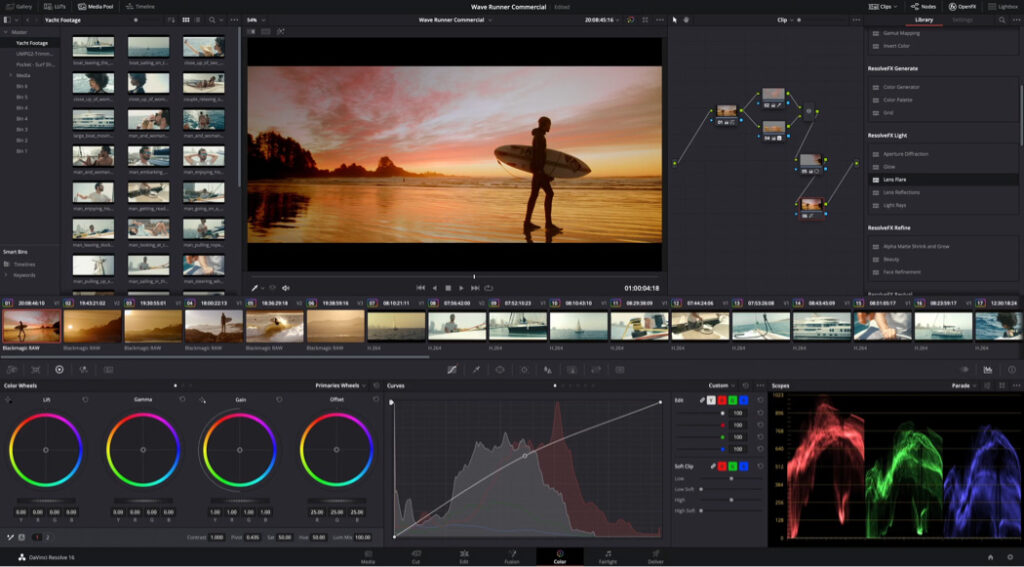
DaVinci Resolve combines editing, colour, visual effects and audio tools within one platform. Video Mastery’s introductory DaVinci Resolve course covers project setup, media management, editing, effects, transitions, colour correction, Fusion visual effects, Fairlight audio and exporting.
There is also an advanced DaVinci Resolve course covering the platform’s main sections, including Media, Edit, Fusion, Color, Fairlight and Deliver. Advanced subjects include multicamera editing, colour grading, nodes, LUTs, compositing, tracking, audio mixing and delivery workflows.
Video Editing Masterclass
For learners who want a broader introduction to professional editing, Video Mastery also offers a Video Editing Masterclass covering Final Cut Pro, Adobe Premiere and DaVinci Resolve.
The course takes participants through the editing process while creating a promotional or training video. Topics include project planning, media organisation, timeline management, trimming, assembling footage, B-roll, titles, captions, motion graphics, colour grading, audio editing, transitions and exporting.
This practical approach can help learners understand how individual editing tools fit into a complete production workflow.
Learn More Than Just Editing
Professional post-production often involves more than cutting footage. Video editors may need knowledge of sound, colour, graphics and visual effects.
Video Mastery’s wider editing and visual effects training includes Adobe After Effects, Adobe Audition, colour grading, animation and other production tools. This allows organisations to develop skills across different stages of the post-production process.
For example, audio training can cover recording, editing, noise reduction, equalisation, compression, mixing and mastering, helping participants understand how sound contributes to the finished video.
Who Can Benefit From Editing Training?
Editing training can be useful for a wide range of learners, including:
- Beginners who want to learn professional video editing
- Marketing teams producing promotional content
- Corporate communications teams
- Trainers creating educational videos
- Social media professionals
- Small businesses creating content in-house
- Experienced editors developing advanced skills
- Organisations wanting to improve their internal production workflow
Video Mastery’s courses are designed for individuals and teams, with most in-house courses accommodating up to four delegates.
Practical and Tailored Training
One important feature of professional editing training is the opportunity to practise skills rather than simply study theory. Video Mastery’s courses are described as hands-on and tailored to the participants’ needs.
Before training, the team can discuss the delegates’ existing skill levels, equipment and the types of videos they want to produce. The course can then be adapted to those requirements.
This approach can be particularly useful for businesses that want employees to develop skills using their existing production setup.
Choose the Right Editing Course
Before booking an editing course, consider your current experience and production goals.
Ask yourself:
- Are you completely new to video editing?
- Which editing software do you currently use?
- Do you need basic or advanced training?
- Do you want to learn colour grading?
- Would audio or visual effects training be useful?
- Are you creating marketing, training or corporate videos?
- Would in-house training suit your organisation?
Choosing training that matches your existing workflow can make the learning experience more relevant and practical.
Start Developing Your Editing Skills
If you are searching for Editing Courses in UK, professional training can help you build practical skills in editing, audio, colour, graphics and visual effects. Video Mastery’s courses include Adobe Premiere Pro, DaVinci Resolve and other post-production tools, with options ranging from introductory sessions to advanced training.
Whether you are beginning your editing journey or developing the capabilities of an existing production team, structured training can help you create a more efficient and professional post-production workflow.
Explore Video Master’s editing training and choose a course that matches your software, experience and video production requirements.
FAQs About Editing Courses in UK
- What are Editing Courses in UK?
Editing Courses in UK teach the technical and creative skills required to edit professional video content. Courses may cover software, editing techniques, audio, colour correction, visual effects and exporting.
- Are video editing courses suitable for beginners?
Yes. Video Mastery offers introductory courses designed for people with little or no previous editing experience, including training in Adobe Premiere Pro and DaVinci Resolve.
- Which video editing software can I learn?
Depending on the course, training can include Adobe Premiere Pro, DaVinci Resolve, Final Cut Pro, Adobe Audition, After Effects and other editing and design tools.
- How long do editing courses take?
Course duration depends on the subject and level. Video Mastery’s editing courses range from one-day introductory programmes to multi-day advanced training.
- Can editing training be provided at my workplace?
Yes. Video Mastery states that most of its courses are delivered in-house at the client’s premises and tailored to the organisation’s needs.
- Can I learn DaVinci Resolve?
Yes. Video Mastery offers both introductory and advanced DaVinci Resolve training covering editing, colour, visual effects, audio and delivery workflows.
- Do editing courses include practical work?
Yes. The courses are designed to be hands-on, with practical exercises and projects used to develop editing skills and workflows.
- Can businesses arrange editing training for employees?
Yes. Video Mastery provides in-house training for organisations and can tailor courses according to delegates’ experience, equipment and production requirements.
- Can I learn advanced video editing?
Yes. Advanced training can cover areas such as multicamera editing, colour grading, masking, advanced transitions, audio editing, visual effects and professional delivery workflows.
- How do I choose the right editing course?
Consider your current skill level, preferred editing software, type of video content and specific production goals. Beginners may start with an introductory course, while experienced editors may benefit from advanced editing, colour, audio or visual effects training.
——————————————————————–
Meta Title: Editing Courses in UK | Video Editing Training
Meta Description: Explore professional Editing Courses in UK with hands-on training in Premiere Pro, DaVinci Resolve, editing, colour grading, audio and visual effects.